---
title: Bricks Builder SureCart Featured Image
date: 2025-12-09T20:26:58Z
modified: 2025-12-09T20:27:00Z
permalink: "https://techarticles.co.uk/bricks-builder-surecart-featured-image/"
type: post
status: publish
excerpt: ""
wpid: 5800
categories:
  - Bricks Builder
  - Coding
  - SureCart
  - Wordpress
timestamp: 2025-12-09T20:27:00Z
tags:
  - Bricks Builder
  - Coding
  - SureCart
  - Wordpress
---

Following a question about getting this data into a bricks query loop, I already had the code and notes for this, so I have quickly written them up to assist others in working with this.

## Where the data “lives”:

The breakdown is really quite simple. [SureCart](https://ta0.uk/surecart) Products are really post types with the sc\_product type. These have a series of meta keys (post metas), and one of those is called product, which contains a very large array of data. Within this array is our target, which is the featured image and the section of that


```
s:14:"featured_image";a:26:{
    s:2:"ID";i:35;
    s:11:"post_author";s:1:"1";
    s:9:"post_date";s:19:"2025-12-09 19:24:58";
    ...
    s:4:"guid";s:101:"https://goose-crocodile-871.wpta.uk/wp-content/uploads/Ashampoo_Snap_Tuesday-4-June-2024_15h0m12s.png";
    ...
    s:2:"id";i:35;
    s:3:"url";s:101:"https://goose-crocodile-871.wpta.uk/wp-content/uploads/Ashampoo_Snap_Tuesday-4-June-2024_15h0m12s.png";
}
```

This is a block contains the following information about our featured image


```
{
  "featured_image": {
    "ID": 35,
    "post_author": "1",
    "post_date": "2025-12-09 19:24:58",
    "post_date_gmt": "2025-12-09 19:24:58",
    "post_content": "",
    "post_title": "Ashampoo_Snap_Tuesday, 4 June 2024_15h0m12s",
    "post_excerpt": "",
    "post_status": "inherit",
    "comment_status": "closed",
    "ping_status": "closed",
    "post_password": "",
    "post_name": "ashampoo_snap_tuesday-4-june-2024_15h0m12s",
    "to_ping": "",
    "pinged": "",
    "post_modified": "2025-12-09 19:24:58",
    "post_modified_gmt": "2025-12-09 19:24:58",
    "post_content_filtered": "",
    "post_parent": 0,
    "guid": "https://goose-crocodile-871.wpta.uk/wp-content/uploads/Ashampoo_Snap_Tuesday-4-June-2024_15h0m12s.png",
    "menu_order": 0,
    "post_type": "attachment",
    "post_mime_type": "image/png",
    "comment_count": "0",
    "filter": "raw",
    "id": 35,
    "url": "https://goose-crocodile-871.wpta.uk/wp-content/uploads/Ashampoo_Snap_Tuesday-4-June-2024_15h0m12s.png"
  }
}
```

## Using It in Bricks – The quick method

Out of this, we need two bits of key information: the `ID `and the `URL`. The easiest way to get them into a query loop would be a single helper function and then echo that function, i.e `{echo:sc_product_featured_image_url()}` or `{echo:sc_product_featured_image_id()}` This will then display this dynamic data a rough snippet could be used and placed in your functions.php or code snippet plugin.

function sc_product_featured_image_url( $post_id = null ) {
    $post_id = $post_id ?: get_the_ID();

    $product = get_post_meta( $post_id, 'product', true );
    if ( empty( $product['featured_image']['id'] ) ) {
        return '';
    }

    // Return the URL for the featured image
    return wp_get_attachment_image_url( (int) $product['featured_image']['id'], 'full' );
}

function sc_product_featured_image_id( $post_id = null ) {
    $post_id = $post_id ?: get_the_ID();

    $product = get_post_meta( $post_id, 'product', true );
    if ( empty( $product['featured_image']['id'] ) ) {
        return '';
    }

    return (int) $product['featured_image']['id'];
}
```
<span class="line"><span style="color: #F97583">function</span><span style="color: #E1E4E8"> </span><span style="color: #B392F0">sc_product_featured_image_url</span><span style="color: #E1E4E8">( $post_id </span><span style="color: #F97583">=</span><span style="color: #E1E4E8"> </span><span style="color: #79B8FF">null</span><span style="color: #E1E4E8"> ) {</span></span>
<span class="line"><span style="color: #E1E4E8">    $post_id </span><span style="color: #F97583">=</span><span style="color: #E1E4E8"> $post_id </span><span style="color: #F97583">?:</span><span style="color: #E1E4E8"> </span><span style="color: #B392F0">get_the_ID</span><span style="color: #E1E4E8">();</span></span>
<span class="line"></span>
<span class="line"><span style="color: #E1E4E8">    $product </span><span style="color: #F97583">=</span><span style="color: #E1E4E8"> </span><span style="color: #B392F0">get_post_meta</span><span style="color: #E1E4E8">( $post_id, </span><span style="color: #9ECBFF">'product'</span><span style="color: #E1E4E8">, </span><span style="color: #79B8FF">true</span><span style="color: #E1E4E8"> );</span></span>
<span class="line"><span style="color: #E1E4E8">    </span><span style="color: #F97583">if</span><span style="color: #E1E4E8"> ( </span><span style="color: #79B8FF">empty</span><span style="color: #E1E4E8">( $product[</span><span style="color: #9ECBFF">'featured_image'</span><span style="color: #E1E4E8">][</span><span style="color: #9ECBFF">'id'</span><span style="color: #E1E4E8">] ) ) {</span></span>
<span class="line"><span style="color: #E1E4E8">        </span><span style="color: #F97583">return</span><span style="color: #E1E4E8"> </span><span style="color: #9ECBFF">''</span><span style="color: #E1E4E8">;</span></span>
<span class="line"><span style="color: #E1E4E8">    }</span></span>
<span class="line"></span>
<span class="line"><span style="color: #E1E4E8">    </span><span style="color: #6A737D">// Return the URL for the featured image</span></span>
<span class="line"><span style="color: #E1E4E8">    </span><span style="color: #F97583">return</span><span style="color: #E1E4E8"> </span><span style="color: #B392F0">wp_get_attachment_image_url</span><span style="color: #E1E4E8">( (</span><span style="color: #F97583">int</span><span style="color: #E1E4E8">) $product[</span><span style="color: #9ECBFF">'featured_image'</span><span style="color: #E1E4E8">][</span><span style="color: #9ECBFF">'id'</span><span style="color: #E1E4E8">], </span><span style="color: #9ECBFF">'full'</span><span style="color: #E1E4E8"> );</span></span>
<span class="line"><span style="color: #E1E4E8">}</span></span>
<span class="line"></span>
<span class="line"><span style="color: #F97583">function</span><span style="color: #E1E4E8"> </span><span style="color: #B392F0">sc_product_featured_image_id</span><span style="color: #E1E4E8">( $post_id </span><span style="color: #F97583">=</span><span style="color: #E1E4E8"> </span><span style="color: #79B8FF">null</span><span style="color: #E1E4E8"> ) {</span></span>
<span class="line"><span style="color: #E1E4E8">    $post_id </span><span style="color: #F97583">=</span><span style="color: #E1E4E8"> $post_id </span><span style="color: #F97583">?:</span><span style="color: #E1E4E8"> </span><span style="color: #B392F0">get_the_ID</span><span style="color: #E1E4E8">();</span></span>
<span class="line"></span>
<span class="line"><span style="color: #E1E4E8">    $product </span><span style="color: #F97583">=</span><span style="color: #E1E4E8"> </span><span style="color: #B392F0">get_post_meta</span><span style="color: #E1E4E8">( $post_id, </span><span style="color: #9ECBFF">'product'</span><span style="color: #E1E4E8">, </span><span style="color: #79B8FF">true</span><span style="color: #E1E4E8"> );</span></span>
<span class="line"><span style="color: #E1E4E8">    </span><span style="color: #F97583">if</span><span style="color: #E1E4E8"> ( </span><span style="color: #79B8FF">empty</span><span style="color: #E1E4E8">( $product[</span><span style="color: #9ECBFF">'featured_image'</span><span style="color: #E1E4E8">][</span><span style="color: #9ECBFF">'id'</span><span style="color: #E1E4E8">] ) ) {</span></span>
<span class="line"><span style="color: #E1E4E8">        </span><span style="color: #F97583">return</span><span style="color: #E1E4E8"> </span><span style="color: #9ECBFF">''</span><span style="color: #E1E4E8">;</span></span>
<span class="line"><span style="color: #E1E4E8">    }</span></span>
<span class="line"></span>
<span class="line"><span style="color: #E1E4E8">    </span><span style="color: #F97583">return</span><span style="color: #E1E4E8"> (</span><span style="color: #F97583">int</span><span style="color: #E1E4E8">) $product[</span><span style="color: #9ECBFF">'featured_image'</span><span style="color: #E1E4E8">][</span><span style="color: #9ECBFF">'id'</span><span style="color: #E1E4E8">];</span></span>
<span class="line"><span style="color: #E1E4E8">}</span></span>
<span class="line"></span>
```PHP

`get_post_meta( $id, 'product', true )` will return an unserialized array for easy using of the data

## Using It in Bricks – The “Native” Polished Method

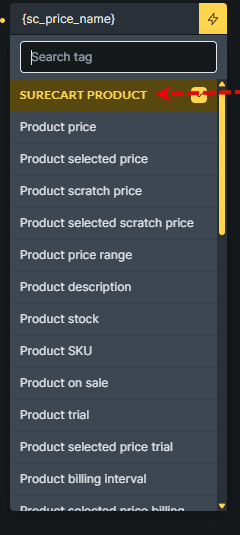
Another way to do this is to utilise the bricks filters for `bricks/dynamic_tags_list` and `<a href="https://academy.bricksbuilder.io/article/create-your-own-dynamic-data-tag/">bricks/dynamic_data/render_tag</a>` I prefer this method as it’s cleaner, easier and feels more stock once you’ve added it, it’s there, so we know the tag list is SureCart Products
![surecart product bricks tag list](https://techarticles.co.uk/wp-content/uploads/2025/12/SureCart-product-bricks-tag-list.png)

So we will target that with our dynamic\_tags\_list to pop it with the rest of the items

<?php 
// 1. Register the tag so it appears in Bricks (with the rest of the surecart items)
add_filter( 'bricks/dynamic_tags_list', function( $tags ) {
    $tags[] = [
        'name'  => '{sc_featured_image}',
        'label' => 'SureCart Featured Image',
        'group' => 'SureCart Product',
    ];
    return $tags;
} );

// 2. Return the value when Bricks renders the tag
add_filter( 'bricks/dynamic_data/render_tag', function( $tag, $post, $context = 'text' ) {
    if ( ! is_string( $tag ) ) {
        return $tag;
    }

    $clean_tag = str_replace( [ '{', '}' ], '', $tag );
    if ( $clean_tag !== 'sc_featured_image' ) {
        return $tag;
    }

    $post_id = $post ? $post->ID : get_the_ID();
    $product = get_post_meta( $post_id, 'product', true );

    if ( empty( $product['featured_image']['id'] ) ) {
        return '';
    }

    $attachment_id = (int) $product['featured_image']['id'];

    // If used in an Image context, return array of IDs (Bricks expects this) :contentReference[oaicite:0]{index=0}
    if ( $context === 'image' ) {
        return [ $attachment_id ];
    }

    // Otherwise return an <img> tag (text context)
    return wp_get_attachment_image( $attachment_id, 'large' );
}, 20, 3 );
```
<span class="line"><span style="color: #F97583"><?</span><span style="color: #79B8FF">php</span><span style="color: #E1E4E8"> </span></span>
<span class="line"><span style="color: #6A737D">// 1. Register the tag so it appears in Bricks (with the rest of the surecart items)</span></span>
<span class="line"><span style="color: #B392F0">add_filter</span><span style="color: #E1E4E8">( </span><span style="color: #9ECBFF">'bricks/dynamic_tags_list'</span><span style="color: #E1E4E8">, </span><span style="color: #F97583">function</span><span style="color: #E1E4E8">( $tags ) {</span></span>
<span class="line"><span style="color: #E1E4E8">    $tags[] </span><span style="color: #F97583">=</span><span style="color: #E1E4E8"> [</span></span>
<span class="line"><span style="color: #E1E4E8">        </span><span style="color: #9ECBFF">'name'</span><span style="color: #E1E4E8">  </span><span style="color: #F97583">=></span><span style="color: #E1E4E8"> </span><span style="color: #9ECBFF">'{sc_featured_image}'</span><span style="color: #E1E4E8">,</span></span>
<span class="line"><span style="color: #E1E4E8">        </span><span style="color: #9ECBFF">'label'</span><span style="color: #E1E4E8"> </span><span style="color: #F97583">=></span><span style="color: #E1E4E8"> </span><span style="color: #9ECBFF">'SureCart Featured Image'</span><span style="color: #E1E4E8">,</span></span>
<span class="line"><span style="color: #E1E4E8">        </span><span style="color: #9ECBFF">'group'</span><span style="color: #E1E4E8"> </span><span style="color: #F97583">=></span><span style="color: #E1E4E8"> </span><span style="color: #9ECBFF">'SureCart Product'</span><span style="color: #E1E4E8">,</span></span>
<span class="line"><span style="color: #E1E4E8">    ];</span></span>
<span class="line"><span style="color: #E1E4E8">    </span><span style="color: #F97583">return</span><span style="color: #E1E4E8"> $tags;</span></span>
<span class="line"><span style="color: #E1E4E8">} );</span></span>
<span class="line"></span>
<span class="line"><span style="color: #6A737D">// 2. Return the value when Bricks renders the tag</span></span>
<span class="line"><span style="color: #B392F0">add_filter</span><span style="color: #E1E4E8">( </span><span style="color: #9ECBFF">'bricks/dynamic_data/render_tag'</span><span style="color: #E1E4E8">, </span><span style="color: #F97583">function</span><span style="color: #E1E4E8">( $tag, $post, $context </span><span style="color: #F97583">=</span><span style="color: #E1E4E8"> </span><span style="color: #9ECBFF">'text'</span><span style="color: #E1E4E8"> ) {</span></span>
<span class="line"><span style="color: #E1E4E8">    </span><span style="color: #F97583">if</span><span style="color: #E1E4E8"> ( </span><span style="color: #F97583">!</span><span style="color: #E1E4E8"> </span><span style="color: #79B8FF">is_string</span><span style="color: #E1E4E8">( $tag ) ) {</span></span>
<span class="line"><span style="color: #E1E4E8">        </span><span style="color: #F97583">return</span><span style="color: #E1E4E8"> $tag;</span></span>
<span class="line"><span style="color: #E1E4E8">    }</span></span>
<span class="line"></span>
<span class="line"><span style="color: #E1E4E8">    $clean_tag </span><span style="color: #F97583">=</span><span style="color: #E1E4E8"> </span><span style="color: #79B8FF">str_replace</span><span style="color: #E1E4E8">( [ </span><span style="color: #9ECBFF">'{'</span><span style="color: #E1E4E8">, </span><span style="color: #9ECBFF">'}'</span><span style="color: #E1E4E8"> ], </span><span style="color: #9ECBFF">''</span><span style="color: #E1E4E8">, $tag );</span></span>
<span class="line"><span style="color: #E1E4E8">    </span><span style="color: #F97583">if</span><span style="color: #E1E4E8"> ( $clean_tag </span><span style="color: #F97583">!==</span><span style="color: #E1E4E8"> </span><span style="color: #9ECBFF">'sc_featured_image'</span><span style="color: #E1E4E8"> ) {</span></span>
<span class="line"><span style="color: #E1E4E8">        </span><span style="color: #F97583">return</span><span style="color: #E1E4E8"> $tag;</span></span>
<span class="line"><span style="color: #E1E4E8">    }</span></span>
<span class="line"></span>
<span class="line"><span style="color: #E1E4E8">    $post_id </span><span style="color: #F97583">=</span><span style="color: #E1E4E8"> $post </span><span style="color: #F97583">?</span><span style="color: #E1E4E8"> $post</span><span style="color: #F97583">-></span><span style="color: #E1E4E8">ID </span><span style="color: #F97583">:</span><span style="color: #E1E4E8"> </span><span style="color: #B392F0">get_the_ID</span><span style="color: #E1E4E8">();</span></span>
<span class="line"><span style="color: #E1E4E8">    $product </span><span style="color: #F97583">=</span><span style="color: #E1E4E8"> </span><span style="color: #B392F0">get_post_meta</span><span style="color: #E1E4E8">( $post_id, </span><span style="color: #9ECBFF">'product'</span><span style="color: #E1E4E8">, </span><span style="color: #79B8FF">true</span><span style="color: #E1E4E8"> );</span></span>
<span class="line"></span>
<span class="line"><span style="color: #E1E4E8">    </span><span style="color: #F97583">if</span><span style="color: #E1E4E8"> ( </span><span style="color: #79B8FF">empty</span><span style="color: #E1E4E8">( $product[</span><span style="color: #9ECBFF">'featured_image'</span><span style="color: #E1E4E8">][</span><span style="color: #9ECBFF">'id'</span><span style="color: #E1E4E8">] ) ) {</span></span>
<span class="line"><span style="color: #E1E4E8">        </span><span style="color: #F97583">return</span><span style="color: #E1E4E8"> </span><span style="color: #9ECBFF">''</span><span style="color: #E1E4E8">;</span></span>
<span class="line"><span style="color: #E1E4E8">    }</span></span>
<span class="line"></span>
<span class="line"><span style="color: #E1E4E8">    $attachment_id </span><span style="color: #F97583">=</span><span style="color: #E1E4E8"> (</span><span style="color: #F97583">int</span><span style="color: #E1E4E8">) $product[</span><span style="color: #9ECBFF">'featured_image'</span><span style="color: #E1E4E8">][</span><span style="color: #9ECBFF">'id'</span><span style="color: #E1E4E8">];</span></span>
<span class="line"></span>
<span class="line"><span style="color: #E1E4E8">    </span><span style="color: #6A737D">// If used in an Image context, return array of IDs (Bricks expects this) :contentReference[oaicite:0]{index=0}</span></span>
<span class="line"><span style="color: #E1E4E8">    </span><span style="color: #F97583">if</span><span style="color: #E1E4E8"> ( $context </span><span style="color: #F97583">===</span><span style="color: #E1E4E8"> </span><span style="color: #9ECBFF">'image'</span><span style="color: #E1E4E8"> ) {</span></span>
<span class="line"><span style="color: #E1E4E8">        </span><span style="color: #F97583">return</span><span style="color: #E1E4E8"> [ $attachment_id ];</span></span>
<span class="line"><span style="color: #E1E4E8">    }</span></span>
<span class="line"></span>
<span class="line"><span style="color: #E1E4E8">    </span><span style="color: #6A737D">// Otherwise return an <img> tag (text context)</span></span>
<span class="line"><span style="color: #E1E4E8">    </span><span style="color: #F97583">return</span><span style="color: #E1E4E8"> </span><span style="color: #B392F0">wp_get_attachment_image</span><span style="color: #E1E4E8">( $attachment_id, </span><span style="color: #9ECBFF">'large'</span><span style="color: #E1E4E8"> );</span></span>
<span class="line"><span style="color: #E1E4E8">}, </span><span style="color: #79B8FF">20</span><span style="color: #E1E4E8">, </span><span style="color: #79B8FF">3</span><span style="color: #E1E4E8"> );</span></span>
<span class="line"></span>
```PHP

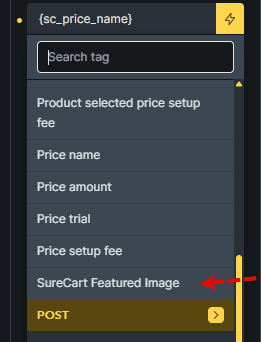
The final result of this small snippet is shown below, where our new SureCart Featured Image is shown
![surecart product bricks render tag](https://techarticles.co.uk/wp-content/uploads/2025/12/SureCart-product-bricks-render-tag.png)