SureContact was released this week, and it has a limit of 500 lifetime spots. It has a live countdown of the available numbers, which you can see in the image below
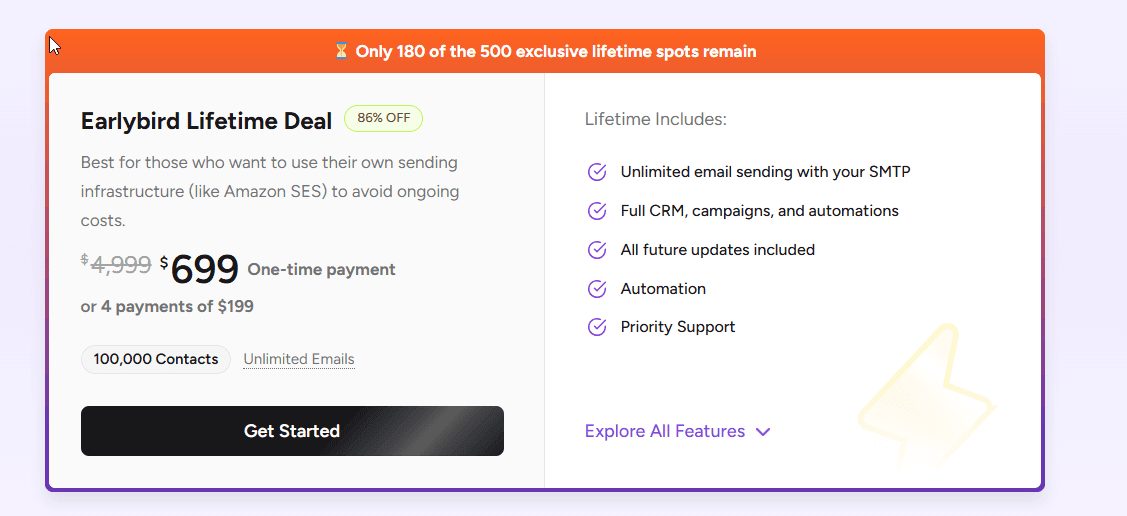
I wanted to recreate this. Now, I already know that if you limit the number of stock SureCart stores, this is in a postmeta called available_stock So I already knew what I wanted to display, and I also know that all SureCart Products are effectively a custom post type, so they have a post id.
This means I had the moving parts; all I needed to do was read it and update it. I decided this was best done by creating a mini rest api point for polling this and writing some front-end JS to look for our wrapped shortcode span and update it dynamically. I settled on updating every 5 seconds, but in reality, you could probably set this to 30 seconds, and you could even make it dynamic so it speeds up as they get closer to being “sold out”.
I added a second code here, which hides the output if there is none left, so our countdown isn’t fake, and could be used to hide a section like the SureContact one above.
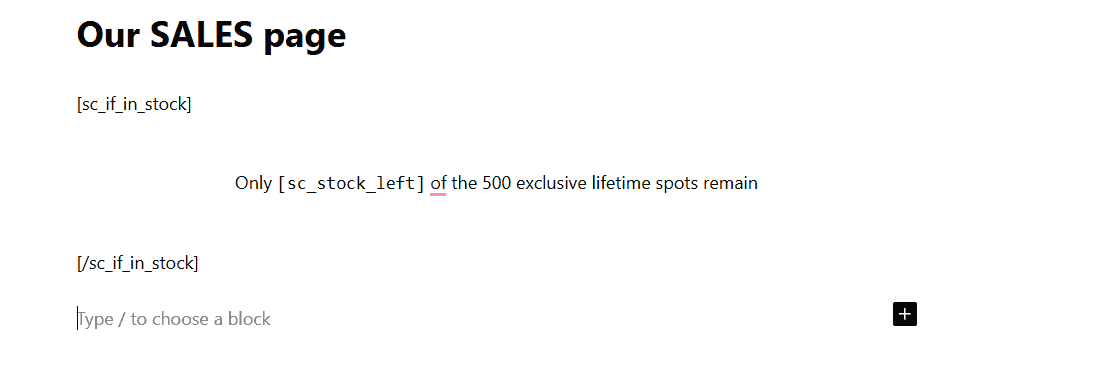
Example Page:
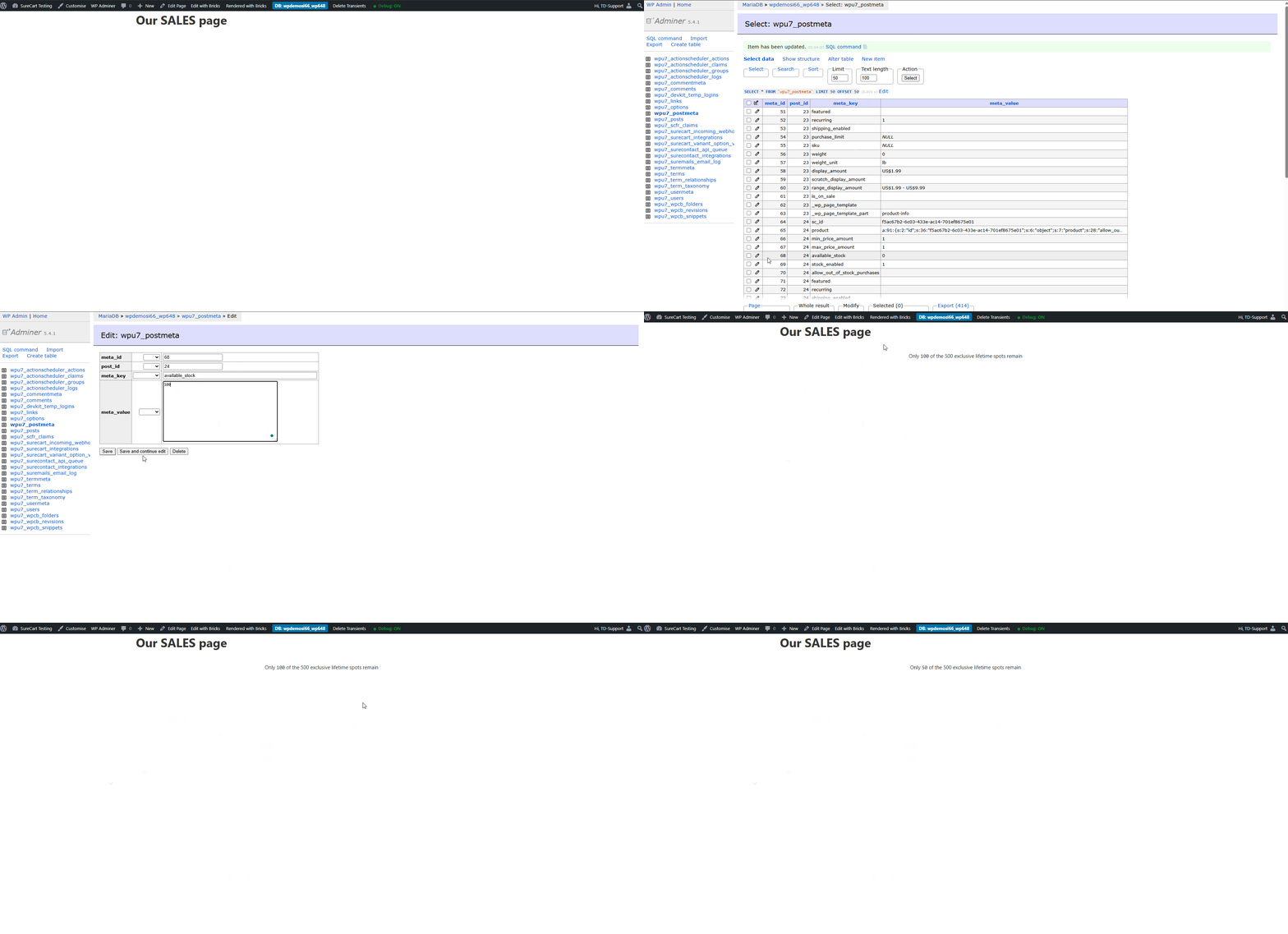
The below gif shows this in action. We start with it hidden because its Zero, we increase to 10,0 then down to 50, and all the updates happen on the page you
The Snippet, edit the post id and your poll interval to your setup
<?php

define( 'SC_STOCK_POST_ID', 24 );                  // your post id
define( 'SC_STOCK_META_KEY', 'available_stock' );  // meta key
define( 'SC_STOCK_POLL_SECONDS', 5 );              // <-- poll interval in SECONDS

function sc_get_available_stock( $post_id = null ) {
	$post_id = (int) ( $post_id ?: SC_STOCK_POST_ID );
	if ( $post_id <= 0 ) return 0;

	$val = get_post_meta( $post_id, SC_STOCK_META_KEY, true );

	// If missing, initialize to 0 so everything "just works"
	if ( $val === '' ) {
		add_post_meta( $post_id, SC_STOCK_META_KEY, 0, true );
		$val = 0;
	}

	return max( 0, (int) $val );
}

/**
 * REST endpoint for stock polling
 * GET /wp-json/sc-stock/v1/available
 */
add_action( 'rest_api_init', function() {
	register_rest_route( 'sc-stock/v1', '/available', [
		'methods'             => 'GET',
		'callback'            => function() {
			return [
				'post_id' => SC_STOCK_POST_ID,
				'stock'   => sc_get_available_stock( SC_STOCK_POST_ID ),
			];
		},
		'permission_callback' => '__return_true', // public read (only exposes the number)
	] );
} );

/**
 * [sc_stock_left] shortcode
 * Wrap output in a span so JS can update it live.
 */
add_shortcode( 'sc_stock_left', function( $atts ) {
	$atts = shortcode_atts(
		[
			'prefix'  => '',
			'suffix'  => '',
			'post_id' => 0, // optional override (not used by polling unless you extend it)
		],
		$atts,
		'sc_stock_left'
	);

	$post_id = (int) ( $atts['post_id'] ?: SC_STOCK_POST_ID );
	$stock   = sc_get_available_stock( $post_id );

	$prefix = esc_html( $atts['prefix'] );
	$suffix = esc_html( $atts['suffix'] );

	// data-sc-stock is used by JS to find/update these nodes
	return sprintf(
		'<span data-sc-stock="1" data-sc-prefix="%s" data-sc-suffix="%s">%s%s%s</span>',
		esc_attr( $atts['prefix'] ),
		esc_attr( $atts['suffix'] ),
		$prefix,
		$stock,
		$suffix
	);
} );

/**
 * [sc_if_in_stock] shortcode
 * Wrap content in a container JS can hide/show live.
 */
add_shortcode( 'sc_if_in_stock', function( $atts, $content = '' ) {
	$atts = shortcode_atts(
		[
			'post_id' => 0,
			'min'     => 1,
		],
		$atts,
		'sc_if_in_stock'
	);

	$post_id = (int) ( $atts['post_id'] ?: SC_STOCK_POST_ID );
	$stock   = sc_get_available_stock( $post_id );
	$min     = (int) $atts['min'];

	$inner = do_shortcode( $content );

	// Always render a wrapper so JS can toggle it without a refresh
	$visible = ( $stock >= $min );

	return sprintf(
		'<div data-sc-in-stock="1" data-sc-min="%d" style="%s">%s</div>',
		(int) $min,
		$visible ? '' : 'display:none;',
		$inner
	);
} );

/**
 * Enqueue inline polling JS on the front-end
 */
add_action( 'wp_enqueue_scripts', function() {
	// Only run on the front-end
	if ( is_admin() ) return;

	wp_register_script( 'sc-stock-poll', '', [], null, true );
	wp_enqueue_script( 'sc-stock-poll' );

	$poll_ms  = max( 1000, (int) SC_STOCK_POLL_SECONDS * 1000 );
	$rest_url = esc_url_raw( rest_url( 'sc-stock/v1/available' ) );

	$js = <<<JS
(function(){
  var pollMs = {$poll_ms};
  var endpoint = "{$rest_url}";
  var lastStock = null;

  function updateStockNodes(stock){
    // Update any [sc_stock_left] outputs
    document.querySelectorAll('[data-sc-stock="1"]').forEach(function(el){
      var prefix = el.getAttribute('data-sc-prefix') || '';
      var suffix = el.getAttribute('data-sc-suffix') || '';
      // Use textContent so it stays safe/plain
      el.textContent = prefix + String(stock) + suffix;
    });

    // Toggle any [sc_if_in_stock] wrappers
    document.querySelectorAll('[data-sc-in-stock="1"]').forEach(function(wrap){
      var min = parseInt(wrap.getAttribute('data-sc-min') || '1', 10);
      if (stock >= min) {
        wrap.style.display = '';
      } else {
        wrap.style.display = 'none';
      }
    });
  }

  function tick(){
    fetch(endpoint, { credentials: 'same-origin' })
      .then(function(r){ return r.json(); })
      .then(function(data){
        if (!data || typeof data.stock === 'undefined') return;
        var stock = parseInt(data.stock, 10);
        if (isNaN(stock)) return;

        if (lastStock === null || stock !== lastStock) {
          lastStock = stock;
          updateStockNodes(stock);
        }
      })
      .catch(function(){ /* silent */ });
  }

  // initial + interval
  tick();
  setInterval(tick, pollMs);
})();
JS;

	wp_add_inline_script( 'sc-stock-poll', $js );
} );