Following a question about getting this data into a bricks query loop, I already had the code and notes for this, so I have quickly written them up to assist others in working with this.
Where the data “lives”:
The breakdown is really quite simple. SureCart Products are really post types with the sc_product type. These have a series of meta keys (post metas), and one of those is called product, which contains a very large array of data. Within this array is our target, which is the featured image and the section of that
s:14:"featured_image";a:26:{
    s:2:"ID";i:35;
    s:11:"post_author";s:1:"1";
    s:9:"post_date";s:19:"2025-12-09 19:24:58";
    ...
    s:4:"guid";s:101:"https://goose-crocodile-871.wpta.uk/wp-content/uploads/Ashampoo_Snap_Tuesday-4-June-2024_15h0m12s.png";
    ...
    s:2:"id";i:35;
    s:3:"url";s:101:"https://goose-crocodile-871.wpta.uk/wp-content/uploads/Ashampoo_Snap_Tuesday-4-June-2024_15h0m12s.png";
}
This is a block contains the following information about our featured image
{
  "featured_image": {
    "ID": 35,
    "post_author": "1",
    "post_date": "2025-12-09 19:24:58",
    "post_date_gmt": "2025-12-09 19:24:58",
    "post_content": "",
    "post_title": "Ashampoo_Snap_Tuesday, 4 June 2024_15h0m12s",
    "post_excerpt": "",
    "post_status": "inherit",
    "comment_status": "closed",
    "ping_status": "closed",
    "post_password": "",
    "post_name": "ashampoo_snap_tuesday-4-june-2024_15h0m12s",
    "to_ping": "",
    "pinged": "",
    "post_modified": "2025-12-09 19:24:58",
    "post_modified_gmt": "2025-12-09 19:24:58",
    "post_content_filtered": "",
    "post_parent": 0,
    "guid": "https://goose-crocodile-871.wpta.uk/wp-content/uploads/Ashampoo_Snap_Tuesday-4-June-2024_15h0m12s.png",
    "menu_order": 0,
    "post_type": "attachment",
    "post_mime_type": "image/png",
    "comment_count": "0",
    "filter": "raw",
    "id": 35,
    "url": "https://goose-crocodile-871.wpta.uk/wp-content/uploads/Ashampoo_Snap_Tuesday-4-June-2024_15h0m12s.png"
  }
}
Using It in Bricks – The quick method
Out of this, we need two bits of key information: the ID and the URL. The easiest way to get them into a query loop would be a single helper function and then echo that function, i.e or This will then display this dynamic data a rough snippet could be used and placed in your functions.php or code snippet plugin.
function sc_product_featured_image_url( $post_id = null ) {
    $post_id = $post_id ?: get_the_ID();

    $product = get_post_meta( $post_id, 'product', true );
    if ( empty( $product['featured_image']['id'] ) ) {
        return '';
    }

    // Return the URL for the featured image
    return wp_get_attachment_image_url( (int) $product['featured_image']['id'], 'full' );
}

function sc_product_featured_image_id( $post_id = null ) {
    $post_id = $post_id ?: get_the_ID();

    $product = get_post_meta( $post_id, 'product', true );
    if ( empty( $product['featured_image']['id'] ) ) {
        return '';
    }

    return (int) $product['featured_image']['id'];
}
get_post_meta( $id, 'product', true ) will return an unserialized array for easy using of the data
Using It in Bricks – The “Native” Polished Method
Another way to do this is to utilise the bricks filters for bricks/dynamic_tags_list and bricks/dynamic_data/render_tag I prefer this method as it’s cleaner, easier and feels more stock once you’ve added it, it’s there, so we know the tag list is SureCart Products
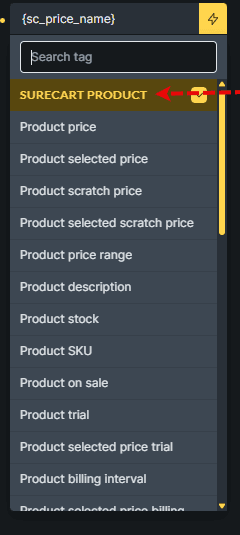
So we will target that with our dynamic_tags_list to pop it with the rest of the items
<?php
// 1. Register the tag so it appears in Bricks (with the rest of the surecart items)
add_filter( 'bricks/dynamic_tags_list', function( $tags ) {
    $tags[] = [
        'name'  => '{sc_featured_image}',
        'label' => 'SureCart Featured Image',
        'group' => 'SureCart Product',
    ];
    return $tags;
} );

// 2. Return the value when Bricks renders the tag
add_filter( 'bricks/dynamic_data/render_tag', function( $tag, $post, $context = 'text' ) {
    if ( ! is_string( $tag ) ) {
        return $tag;
    }

    $clean_tag = str_replace( [ '{', '}' ], '', $tag );
    if ( $clean_tag !== 'sc_featured_image' ) {
        return $tag;
    }

    $post_id = $post ? $post->ID : get_the_ID();
    $product = get_post_meta( $post_id, 'product', true );

    if ( empty( $product['featured_image']['id'] ) ) {
        return '';
    }

    $attachment_id = (int) $product['featured_image']['id'];

    // If used in an Image context, return array of IDs (Bricks expects this) :contentReference[oaicite:0]{index=0}
    if ( $context === 'image' ) {
        return [ $attachment_id ];
    }

    // Otherwise return an <img> tag (text context)
    return wp_get_attachment_image( $attachment_id, 'large' );
}, 20, 3 );
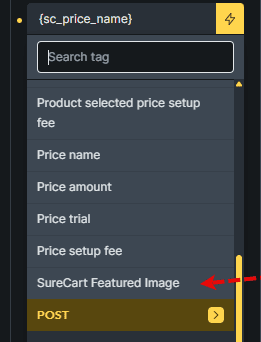
The final result of this small snippet is shown below, where our new SureCart Featured Image is shown