I have been a Laragon user locally for quite a while, and I have been using local dev more and more as I code because it’s just convenient to be able to open up the directory in Sublime and work away. I have been able to achieve some of this using WPcodebox IDE, but it’s not the same as a fully local site, at least for the early dev work, where lots of mistakes happen.
A lot of my projects, though, contain code that requires webhook responses, i.e from SureCart, and this has been tricky up to now. I’ve tried Grok and others, but it hasn’t worked for me. for what I need.
I did some work on fixing some of my pain points with local working, too, and this one came up. I first created a new local project index.php inspired by one released by Marko from dPlugins, but this one does more than list folders; it was fully searchable, allows badges to be displayed depending on what’s installed, and thanks to a little watcher magic, allows me to open up the folder in Sublime Text 4. It works for my workflow, and thanks to devkit, I have that Adminer goodness for database work.
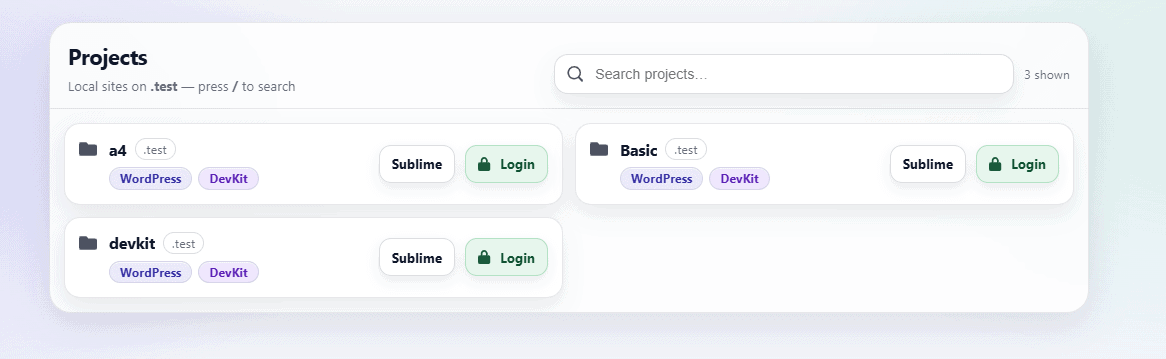
Coupled with my upgrades to my bundle installer in ninja-updater, this could mean I have a fully working bricks site in a matter of minutes, from cloning a basic install to installing it using the bundle to resetting the site using devkit. The advantages also mean I can use git as I am working locally and am less likely to lose what I am working on.
FlowMattic / SureCart
This is where I was always let down on local dev; passing webhooks and other connections was just not efficient. There was no set-and-forget functionality I could get to work 100% of the time, and on reinstalling this computer the last few days, I wanted to see if I could get this functioning as I wanted.
After much research, it was Cloudflare to the rescue with Cloudflared, an easy-to-install command winget install --id Cloudflare.cloudflared and the shock horror that it doesn’t autoupdate on Windows, but can be easily updated by running cloudflared update on the command line (elevated window)
Setting up Cloudflared
So I had it installed, and I had already decided to buy a dedicated domain for this for the cost of £4 a year, it’s just worth it, so I bought myhooks.uk. Once this was set up and migrated, I was good to go, and then I moved on to set up.
Please note: Laragon is on the path, so I have access to PHP, and any bat files I talk about are elevated.
I then create my Tunnel by running the following commands
- cloudflared tunnel login
- cloudflared tunnel create laragon-dev
After that, I navigate to my user directory and create ~/.cloudflared/config.yml which looks like this
tunnel: 422979c4-ebda-45e4-XXX-XXXXXXXXXX
credentials-file: C:\Users\yourusername\.cloudflared\422979c4-ebda-45e4-XXX-XXXXXXXXXX.json

ingress:
  - service: http://localhost:80
Now over to Cloudflare
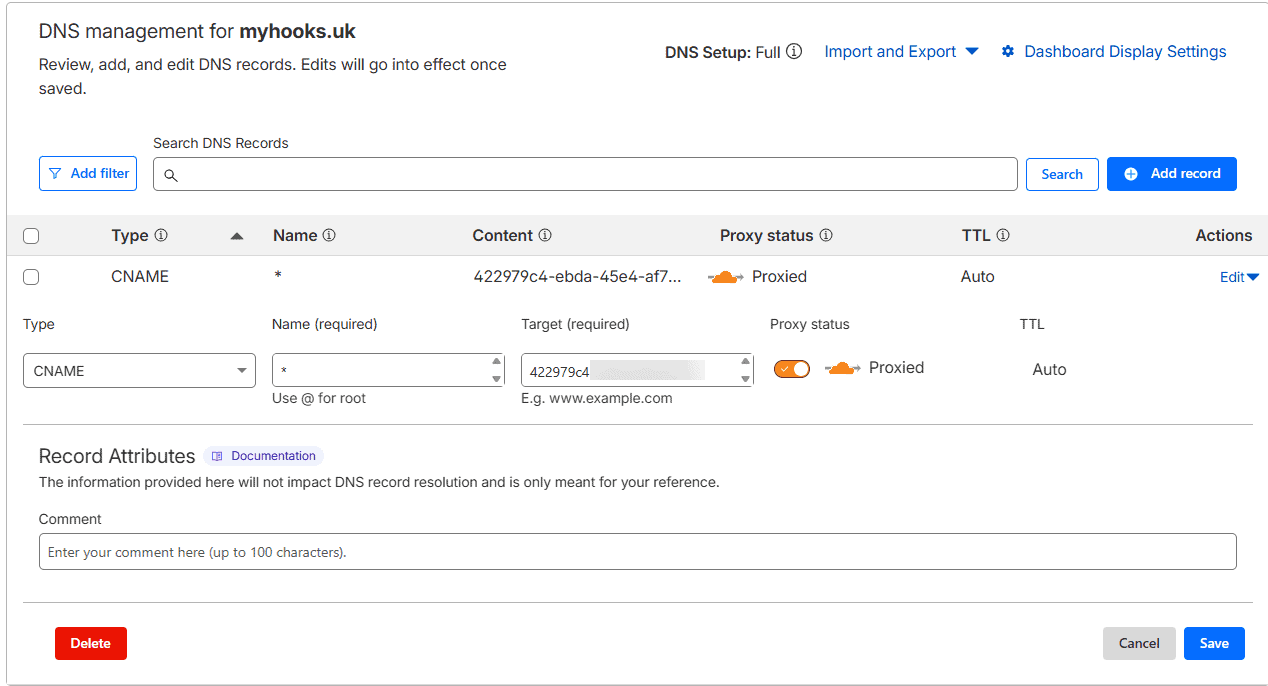
We just need to make a wildcard CNAME record * –> 422979c4-ebda-45e4-XXX-XXXXXXXXXX.cfargotunnel.com make sure our proxy is enabled.
Largon NGINX Setup
Now, rather than set up and edit every single ngnix and because there is no <<project-name>> tag in Laragon templates, I decided just to create a single overarching zz-myhooks-wildcard.conf for this.
so in C:/laragon/etc/nginx/sites-enabled/ i created a new zz-myhooks-wildcard.conf and inside that was the following, based on my setup of it being at C:\Laragon and my domain being myhooks.uk
server {
    listen 80;

    # Match: <project>.myhooks.uk  (e.g. forward.myhooks.uk)
    server_name ~^(?<site>[a-z0-9-]+)\.myhooks\.uk$;

    root c:/laragon/www/$site;
    index index.php index.html index.htm;

    location / {
        try_files $uri $uri/ /index.php?$args;
    }

    location ~ \.php$ {
        include snippets/fastcgi-php.conf;
        fastcgi_pass php_upstream;
    }

    client_max_body_size 2000M;

    location ~ /\.ht {
        deny all;
    }
}
I then reset nginx to load this up.
Now you could stop here, but I also created a script that adds the above conf if it’s missing and adds the following items to the wpconfig of each site I tell it to, just to help it function better as a dual .test and .myhooks.uk domain. in the below example i am using bricks.test as the domain
/ BEGIN TUNNEL DOMAIN OVERRIDES (auto)
//
// This block cooperates with Laragon.
// Laragon may define WP_HOME / WP_SITEURL earlier.
// We only define them if not already defined.
//

if (!empty($_SERVER['HTTP_X_FORWARDED_PROTO']) && $_SERVER['HTTP_X_FORWARDED_PROTO'] === 'https') {
    $_SERVER['HTTPS'] = 'on';
}

$host = strtolower($_SERVER['HTTP_HOST'] ?? '');

if (str_ends_with($host, '.test')) {

    if (!defined('WP_HOME')) {
        define('WP_HOME', 'http://bricks.test');
    }
    if (!defined('WP_SITEURL')) {
        define('WP_SITEURL', 'http://bricks.test');
    }

} elseif (str_ends_with($host, '.myhooks.uk')) {

    if (!defined('WP_HOME')) {
        define('WP_HOME', 'https://bricks.myhooks.uk');
    }
    if (!defined('WP_SITEURL')) {
        define('WP_SITEURL', 'https://bricks.myhooks.uk');
    }

}
//
// END TUNNEL DOMAIN OVERRIDES (auto)That is effectively everything all set up. The only thing to do now is start your tunnel, and that’s really easy to do once everything is set up
Starting our Tunnel, I’ve created a bat file with the required code in it and added it as a button on my Stream Deck
cloudflared tunnel run laragon-devAll is set up correctly. it you want to test it beyond just visiting it in a browser, set up a flowmattic and open up a webhook, and go to https://hoppscotch.io and set up a response to that webhook. If all is set up correctly, you should see the information sent in your flowmattic if you capture the response.
~ Happy Local Dev