I spend a lot of time reading documentation, testing out ways to do modifications to my WordPress Stack and this means one of the things I do is GREP for actions often. In my article a month or so ago I shared how I find filters and actions using GREP and Notepad++ for various plugins.
A post on the Facebook group for SureForms asked an interesting question yesterday about adding the time to a hidden field on submit in SureForms, and natively, it isn’t possible; there are two options for date, but not time. Like most of these simple-needed items, I have actually previously done this, and it was achieved using a couple of well-placed filter hooks, which are not at the time of writing. In fact, at the time of writing, there are only 14 documented filter hooks for SureForm, and there are a lot more than that.
Like all good integrations, it pays to know more than just the code if we are truly going to understand what we are doing, and the two undocumented filter hooks we are going to use in this tutorial are SmartTag Related, a smart tag being a simple replacement strategy where the output is generated it is replaced with the current rendering of that tag so a pretty normal smart tag is {site_url} as no one knows the final site the code will be run on, so it’s used and replaced dynamically on the site it is installed on.
Now SmartTags and their exact format change depending on the plugin or software; some double-wrap their tags {{Tag}} others single {tag}, but in SureForms case, it is a single wrapped SmartTag.
In SureForms
SureForms smart tags are a powerful way to inject dynamic data into forms, confirmations, emails, redirects, and even hidden fields. While the built-in tags like site_url or {user_email} cover common use cases, SureForms also provides a native, extensible system for adding and modifying your own smart tags without JavaScript or field-by-field mapping.
How Smart Tags Work Internally
SureForms processes smart tags in two distinct stages:
- Validation / Whitelisting SureForms first checks whether a smart tag is allowed by comparing it against a list of registered tags.
- Parsing / Resolution Once a tag is considered valid, SureForms resolves it to a final value (string or array).
Both stages are mandatory. If either step is missing, the tag will silently fail.
The Two Required Hooks
1. Register (Whitelist) the Smart Tag
add_filter( 'srfm_smart_tag_list', function( $tags ) {
    $tags['{rup_time}'] = __( 'RUP Time (24h)', 'your-textdomain' );
    return $tags;
}, 20 );2. Parse (Resolve) the Smart Tag
add_filter( 'srfm_parse_smart_tags', function( $parsed, $args ) {
$tag = $args['tag'] ?? '';
if ( '{rup_time}' === $tag ) {
return wp_date( 'H:i', current_time( 'timestamp' ) );
}
return $parsed;
}, 20, 2 );All of this is handled within the main SureForms plugin in \sureforms\inc\smart-tags.php
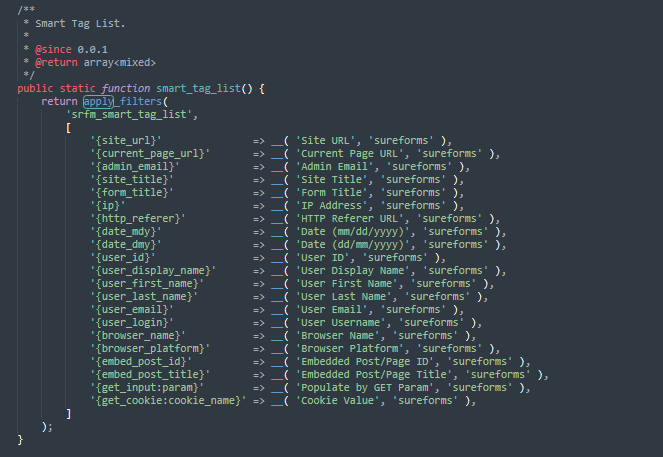
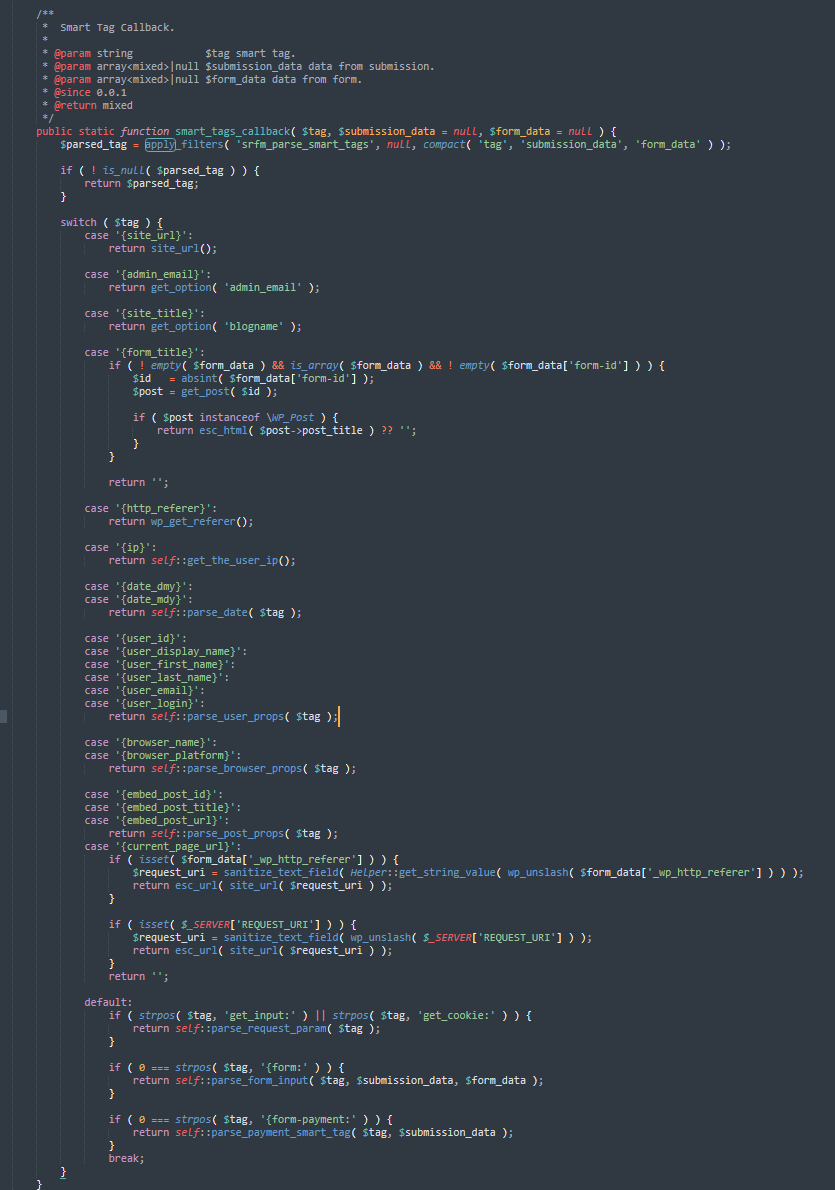
You can see the context of each in the following screenshots
Our Smart Tag List
How we Parse our Smart Tags
Putting this all together to get our submission time
So the question was specifically about submission time, and putting this all together we can easily achieve this, and we will do this as our snippet but we could also achieve a smart tag that, for example, reads an ACF field where the same form is used on, for example branch pages that may display the same form on many pages but we want to know what branch it came from not a human readable number but a 5 digit branch code.
An ACF field and a hidden field, and a couple of snippets for adding and parsing, and we would be able to populate our date with this information.
Getting and showing our time
Registering our time smart tag {rup_time} is as simple as the snippet below, and on parsing of the smart tag, we set the current time and return it to be added to the output.
<?php
// 1) Register the tag (required for rendering)
add_filter( 'srfm_smart_tag_list', function( $tags ) {
	$tags['{rup_time}'] = __( 'Current Time (24h)', 'your-textdomain' );
	return $tags;
}, 20 );

// 2) Resolve the tag value
add_filter( 'srfm_parse_smart_tags', function( $parsed, $args ) {

	if ( '{rup_time}' === ( $args['tag'] ?? '' ) ) {
		return wp_date( 'H:i', current_time( 'timestamp' ) );
	}

	return $parsed;
}, 20, 2 );
Notes: the your-textdomain is to allow translation.
Using the information contained within this article, we could create all sorts of smart tags which are dynamically fed from any information that is contained within the WordPress site.
Why are they undocumented?
I can’t answer this, but in development, it’s not unusual for development to move ahead from documentation and I imagine over time they will document these and offer examples of how they can be used and should be used but in the mean time remembering the linked article on grep and notepad ++ searching for filters and actions is one way to capture these useful but undocmented feature sets, I also have no doubt thst documentation will become very good given how good I find SureCarts documentation.
On Documentation and SureForms
I was both pleasantly surprised and disappointed in equal measure to see they now have a documented integration filter, but they have chosen to make it only work with PRO / Business Versions of SureForm. This would have made things like integrating HookSure or Response for SureFrom easier and feel more native and would have extended what I could do with SureForms and also increase what I could offer but for me to devote the time to it I need to be able to target all users not just paying users, my hope is building off of SureForm becomes widely supported and not limited to a paid feature, I will continue to monitor this development.