It’s no surprise that I keep looking and improving my Devkit workflow; it is an essential part of my day-to-day toolkit. Marko and the team over in dPlugins have the only other plugin that goes in when I am working on any site beyond my own utility plugin; it is, without exception, the most useful plugin that isn’t one of my own.
If you haven’t bought it yet, they have a sale on DSUMMER2026 for 40% off, which makes it an absolute steal at $47.40 for unlimited sites. No licence key, honestly; I can’t recommend this plugin enough. I must use it every single day for adminer or a quick backup, or to reset an environment and restore a previous state. You can get it here, and there is zero sponsorship here. Just today, I have made several suggestions and improvement requests, and I have another one while making this article/video ( A CRON manager/editor).
Which brings me nicely to today’s work: one of the features that I haven’t used is the ability to automatically log in via IP address, and the reason for this is that I live in the UK, and in the UK it’s most common that you don’t have a fixed IP you get a dynamic IP address assigned to your “session” and this can be changed without notice sometimes several times a day.
Dynamic IP Addresses
Dynamic IP addresses are commonly used by Internet Service Providers (ISPs) in the UK because they are efficient and cost-effective. A dynamic IP address is automatically assigned to a customer’s device from a pool of available addresses whenever the device connects to the internet. This means the IP address may change periodically, such as after restarting the router or when the lease expires. Most home broadband customers use dynamic IPs because they provide sufficient functionality for everyday activities like browsing, streaming, and online gaming. Static IP addresses, which remain the same, are usually offered as an optional service for businesses or users who require permanent remote access.
This isn’t just a UK item, but it is rare to get a fixed permanent IP to use, so you are left without this functionality, something I needed to solve for my CAD server, which holds my licences for my CAD software so I can use it both at home and away. I solved this one years ago using my personal domain and this repository https://github.com/fire1ce/DDNS-Cloudflare-PowerShell on the server that runs the licence server and my Emby and other devices.
I also wrote another Python script that runs on the main computer that notifies me on Discord when my IP changes, as it’s always been useful for me to know these details, as I use it in several scripts to allow me local access to my personal repo; for example, otherwise my local by Flywheel can’t install as the IP isn’t approved in the backend.
Getting this working with Devkit
Please Note: I have changed how I have done the Python section of this in my setup, as my original Python script also handled the IP changes for my repo. As noted, I have assumed that no one else needs this, so I have omitted it and can confirm the below does what is needed, including an optional Discord notification
So now the workflow: I already have this Python script, so what I need it to do now is also output a clean set of lines: two IP addresses, at most one IPV4 and one IPv6, and have them available for the websites to pick up and let me know on Discord when it changes because I want to know.
The Python on my Windows machine is on the path, so I just added a bat file to run it to my task scheduler on an hourly basis and I am done, I already had this setup and this is what it looked like so, I all I needed to do today was modify the python to output the new clean file in a place I can sync it. You can see my scheduled task below.
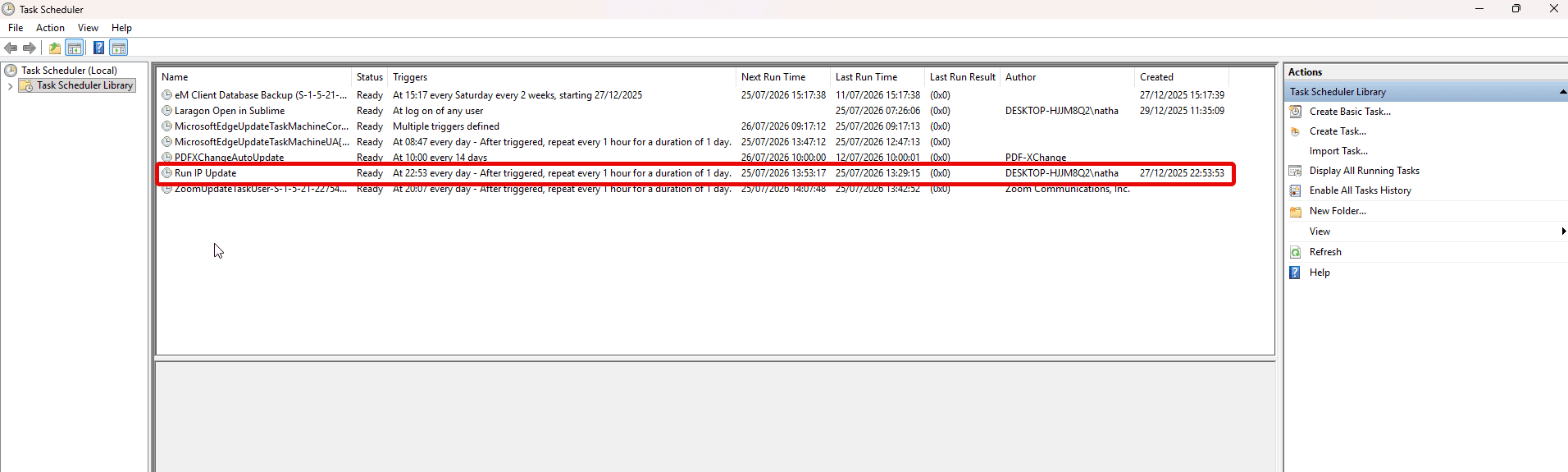
So now we need the Python; in my case, I use SyncBackPro to sync the file changes to one of my dev domains. This is also how I keep my repo and its code uptodate means its in Git, and It syncs to the internet, excluding the git files. There are lots of ways to sync to the internet and a domain; you could auto-commit it to a repo, a pastebin or a gist too if you have the facilities on your computer.
So the Python script now can output a new file to a location of my choice in the clean format for you to sync however you want; below is a copy of the Python file I used to generate and do this. You will need to update paths and configurations for your own setup, but the script itself should work fine.
OK, so the hard bit has been solved?
Yes and no, I now have a reliable, easy way to know when my IP changes and now I need to get that into devkit on the sites I want it to in a reasonably reliable way when it updates, I also setup some seperate monitoring using flowmattic to tell me what the file says when its updated so I can be notified by discord if there is ever a descrepency this step is undocumented but is only for my own piece of mind IP spoofing to the level needed here is difficult to achive but this piece of mind helped me want to test this version.
So what’s next
- A reliable way to update devkit with these new IP addresses is needed
- A way to force the update if it hasn’t happened when I visit.
So let’s deal with updating devkit; using devkit, I was quickly able to work out what options did what and what I would need to populate, adminer (included in devkit) then allowed me to export these and have the model for what I needed, this was a 2 minuite job set it to a known figure then look for it in my case Maintenance IP and Admin IP.
From here I needed to decide on a timeline; I think 15-minute intervals are more than enough. You can see from my scheduler it only runs once an hour anyway; this means my maximum stale time can be 1 hour and 15 minutes in total, but only 15 minuites on line. This is important, as once the IP address leaves me, I have no idea who is using it.
So a new 15-minute cron was created to run my script every 15 minutes. What this does is read the synced file from the remote site and directly write it to the database. The risk here is the security of the remote file, but it’s on my own server and under my own control.
I also thought about other circumstances that don’t currently apply to me, such as maybe wanting fixed or other IP addresses available, so I have allowed for it to write multiple programmed IPs back to the list too; let’s say you have VPN or other access you need to make sure remains too.
So we need it to run, create the cron and then to sit and run every 15 minutes against the configuration, be able to support maintenance mode and autologin and be configurable, the list is pretty endless but we can acheive all of this in my case a snippet will be added to my utility plugin, I can turn on for sites that I want this to work with you could do the same or add it to your favourte snippet plugin.
So I settled on the WordPress code, including the ability to force and update when I get to a site that doesn’t just open the doors that should be, i.e because the IP is stale. Now I have written this script differently to how I would usually work; I would usually go username first as I tend to use the same username when working on sites, but I actually wrote it email address first as I understand this is how most people work: different usernames and a single email address.
So this is the snippet I settled on, and I will distribute a version of this to my utility plugin in future. In testing, it has performed really well.
So were done?
Yes, technically we have met the brief, but I am nothing if not lazy; who wants to be remembering manual update commands? Well, not me. I am an automation expert after all I like things to just work, but in this case I can’t really do that, but I do want it to be frictionless. This one took some time to consider time for a cuppa!
So after my cuppa, I realised I could use my favourite browser tool, Tapermonkey. We know what the URL is; we set the key, and if we land on a page that should be working but is stale, hit Ctrl and B, and it will load a new tab with the manual update parameters, run it, close it and reload the current tab.
So we then have our tapermokney script, a little bit of trial and error and some AI help (I hate JS), and I had exactly what I needed. You can see the Full Script below.
So thats all the moving parts of this project done; this quick bubble below shows it in action and how it all works without the Tapermonkey script for that. When I get to the site that isn’t working, I just hit CTRL and B, and it handles the heavy lifting for me. Why not?