I have been working on improvements for AutomaticCSS. I use it on several sites, including this one, and it’s bugged me that it’s not very Gutenberg-friendly (It doesn’t load in the editor by default) and accessing the classes is difficult.
I have two improvements: one using the free Formatting Extender and one to load it into the block editor for when you’re writing posts and displaying them
Block Editor Setup
The following snippet loads some of the most needed styles into the block editor to make blocks follow the design principles of AutomaticCSS
I added this to WPCODEBOX, and now my blog posts follow the structure and styles laid out in AutomaticCSS. This was the first improvement I have made; the second is a little more complex
Using Formatting Extender
This is a technical link between both 3.x and 4.x versions of Automatic CSS and allows them to be viewable in the editor it looks like this in practice
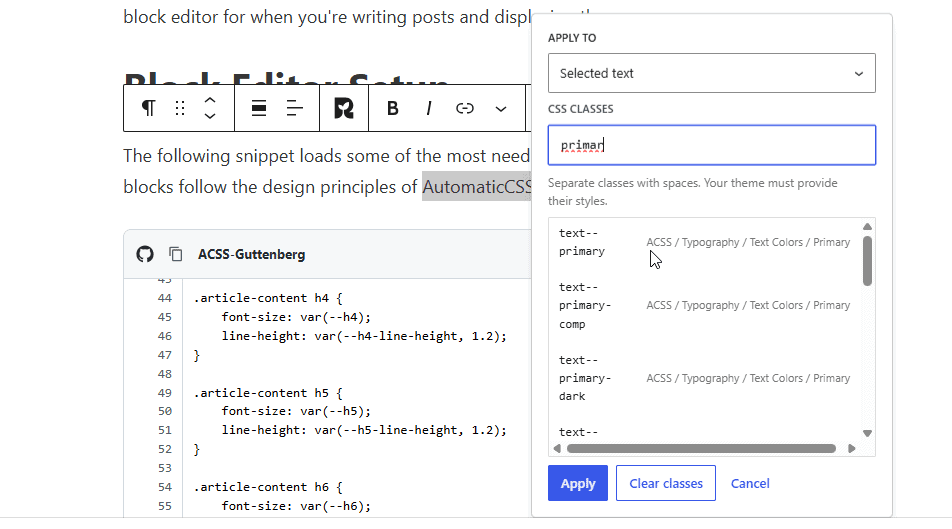
The integration works by dynamically reading the framework.json file included with the installed version of Automatic.css, whether 3.x or 4.x. This JSON file provides the framework’s class definitions, categories, groups, and variants, allowing the snippet to organise CSS classes into meaningful sections such as Typography, Spacing, Layout, Grid, and Buttons. Rather than maintaining a hardcoded list of classes, the snippet uses the Automatic.css framework loader (Automatic_CSS\Model\Config\Framework) and its get_classes() method to retrieve the available utility classes. These are then matched against the JSON definitions to build a categorised list, with any classes that cannot be matched placed into an ACSS / Other category. Because the information is retrieved from the currently installed Automatic.css version, the integration automatically adapts to differences between versions 3.x and 4.x without requiring separate configurations.
The categorised class list is passed to Formatting Extender through its WordPress filter formatting_extender_css_classes, which allows external plugins and custom snippets to register additional CSS class suggestions. When WordPress loads the editor and Formatting Extender applies this filter, the snippet checks that Automatic.css is available, loads its framework configuration, processes the JSON hierarchy, and merges the resulting classes with any existing suggestions. Formatting Extender can then present these classes within its interface, allowing users to search for and apply Automatic.css utilities directly without manually entering every class name. The integration does not generate CSS itself; Automatic.css remains responsible for compiling and loading the actual styles. This approach keeps the two plugins independent, avoids modifying their core files, and provides a maintainable, update-friendly connection between Automatic.css and Formatting Extender.