After sometime I have decided to launch paid article access on techarticles. This will always give you a choice: a single one-time fee to buy the articles you need expected costs for this will be $5-40, depending on the content and the value. In addition to accepting donations on this site for the free articles, you can now purchase an all-access subscription. All access is priced at $149, but I have dropped the early access to $99 and will leave it here until I build up a sizable number of articles that are premium. I expect this will be almost all of 2026; your all-access fee will apply for as long as you are a subscriber.
Note: Please don’t buy this article, it doesn’t contain anything worth buying. I have enabled premium below so you can see and interact with the article
How does this work?
This is all powered by Post Access Manager for SureCart and has been designed to be as user-friendly as possible. You can buy individual items and will get access to that article, including any updates to that article. You can also subscribe to All Access. This will get you access to all premium content on this site, and there will be other benefits as time progresses.
When you get to a premium article, you will know because you will see two identifiers. Firstly, on the site, when browsing a premium article is denoted by a crown on the read more link, as per the image below

This uses the Post Access Manager for SureCart Bricks condition and is therefore always shown when a post is locked. I will also try to tag them with the category of premium, so you can see and view all premium articles.
When you open a premium article, you will either immediately see the lock screen or you will get the excerpt, and then it will be locked below that using either the Post Access Manager for SureCart-protected block or shortcode.
A premium listing will look like the one below. You can sign up for the subscription with this link or just buy the access you need by clicking unlock article, the individual article is a one-time purchase, and the all-access subscription is exactly that, an annual subscription and your access is contingent on being subscribed.
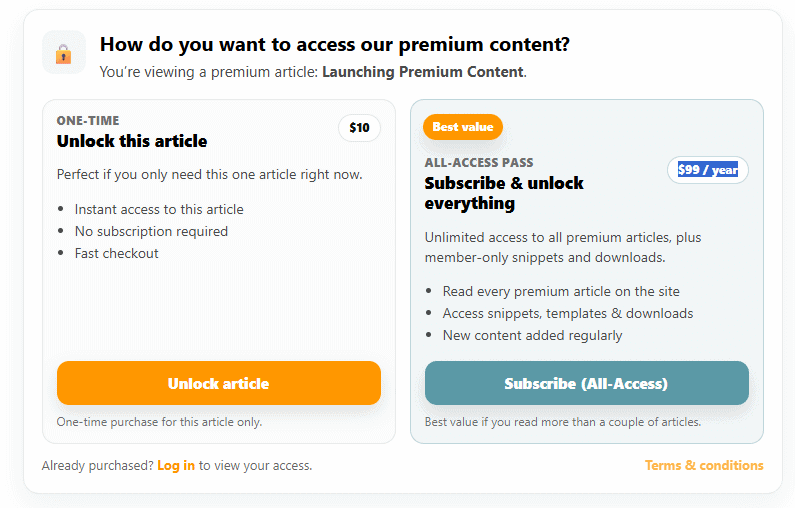
I have locked the content below this so you can interact and view what it looks like on an actual post, please as per the note above, don’t buy this post; there is nothing to see below.
Please do consider subscribing and report any issues you discover as we bed this in.
How do you want to access our premium content?
You’re viewing a premium article: Launching Premium Content.
Perfect if you only need this one article right now.
- Instant access to this article
- No subscription required
- Fast checkout
Unlimited access to all premium articles, plus member-only snippets and downloads.
- Read every premium article on the site
- Access snippets, templates & downloads
- New content added regularly