In this article, I look at working with CraftForms to have native embedded forms on sites I run Simply Static on. There are two hopes for me here when it comes to static form embedding using CraftForms rather than Simply Static’s own form integration, which is now considerably better than ever, but it has some limitations in its current version.
1. Speed: add the shortcode, and CraftForms should just work forever; it’s all CraftForms native, so as long as CraftForms are working, this should just work. No FluentForms have updated, so we need a patch in Simply Static.
2. The one I am most excited for is the possibility of being able to take payments natively in static forms using CraftForms’ current Stripe integration this is exciting even more so if payments expand to Polar, Paddle, Dodo etc as this opens up e-commerce in static sites in a way currently not as easy to acheive, add in an automator like FlowMattic and you could do all sorts from your new static landing page in this static ecommerce world.
About CraftForms & The Static Build
I need to be clear: I am using the PRO version of CraftForms currently available for $149.99 for unlimited installations, which is an absolute steal for some of the wizardry in CraftForms; I don’t believe the embedded functionality is available in the community free version.
I personally think the price is really good for an unlimited install and particularly for older clients who don’t update sites often but need that form functionality. A static conversion could make it easier for you to manage and work with. Its e-commerce customisation options are amazing too.
The site I use in this example is a Kadence Starter theme, Simply Static, and CraftForms; that is all, and we end up with a functioning static website from what we already had. This isn’t the best way to build a static site and is more about converting and storing static sites for future use.
So I asked the question: is this possible?
While thinking about this, I saw no reason why this couldn’t possibly work for a static form, but I asked in the Facebook group just to be sure; the drive for CraftForms to work with static sites has been there early on it works well. Could I bypass SimplyStatic form integration and go low-key native?
Vitalli, the developer, seemed to think so, so I fired up a test installation and began looking at the possibilities for this. I have played with this before, so I knew what I needed to do, but he helpfully gave me the key doc link: Embedding Forms with Shortcodes – Specifically, we want this section here titled Examples, and after some testing it was apparent to me that key worked best for my circumstances.
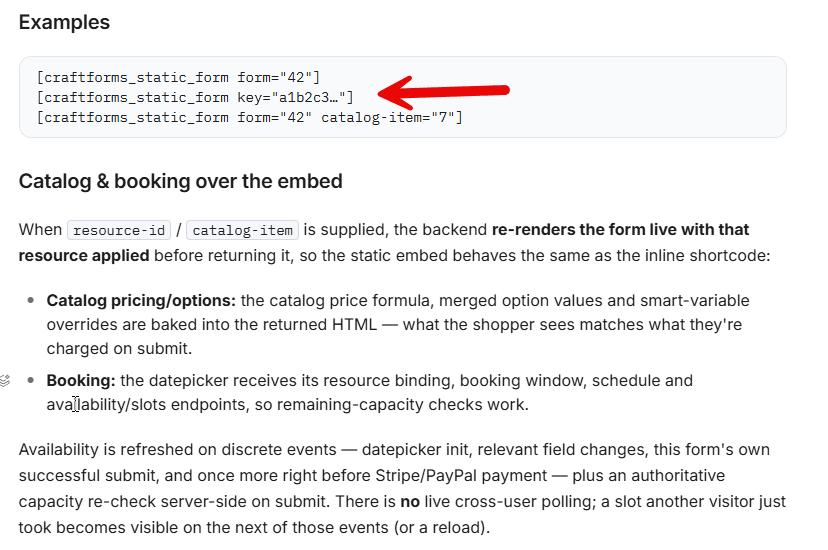
Now we have the structure
So now we had the structure; we needed the moving parts, to get this working requires a few key things to be in place, and this next section will cover those for our example form
- Create our replacement form
- Make the form embedable
- Generate the embed key
- Add our shortcode from above.
Creating our replacement form:
This one is simple; I just used the template form and changed how it looked to match the original Kadence form installed and set up. You can design your form however you want based on the setup of CraftForms to reflect what you wanted to do. I also copied the submit button’s additional classes to mimic its behaviour. You can see the form below, i’ve removed the labels and added placeholders instead to match the original form.
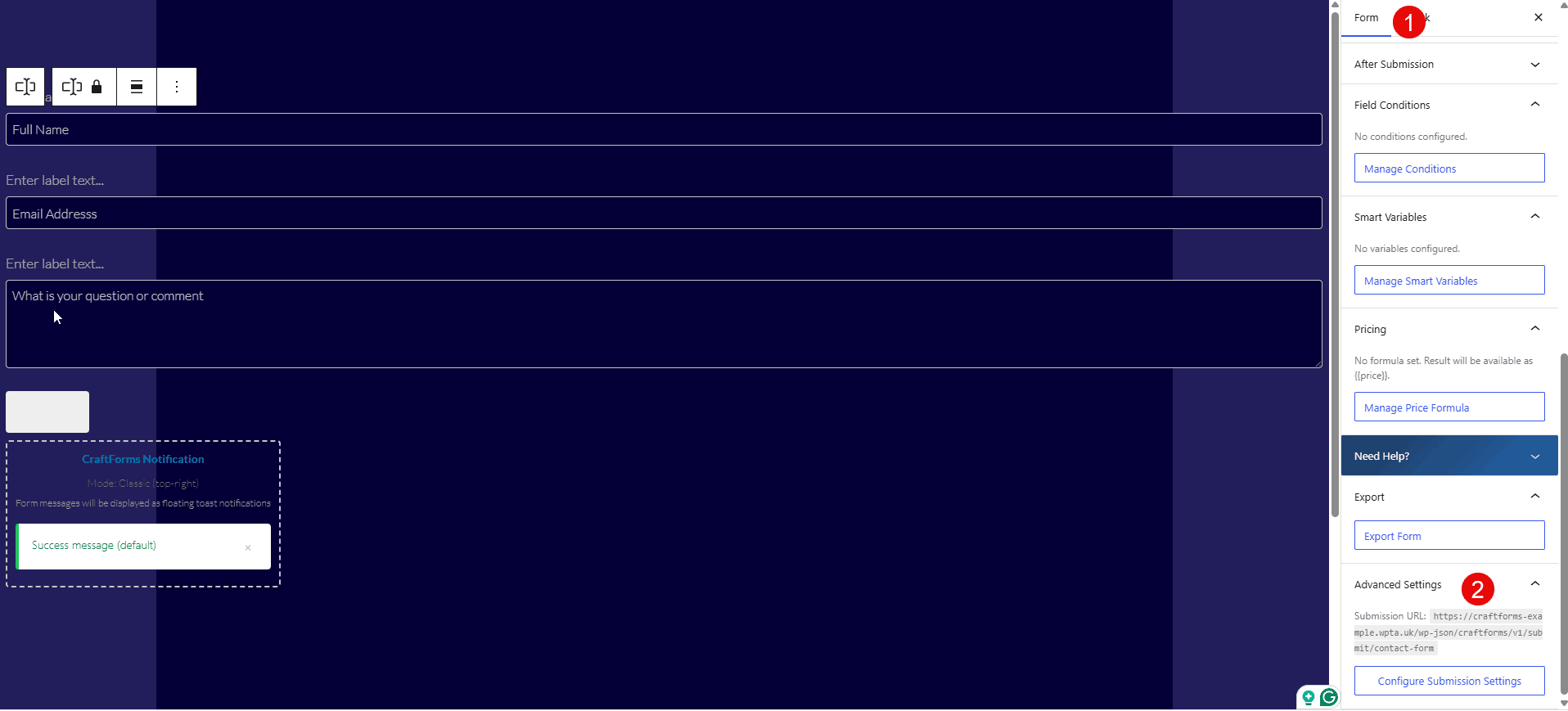
Make the form embedable
Now we need to make it embedable. To do this, we need to select the form object (1), navigate to advanced settings, and select Configure Submission Settings (2) in the image above. Once we have done that, the image below will be available. We now need to allow external submission, and if you want to give it a custom REST endpoint instead of UUID, I went with contact form
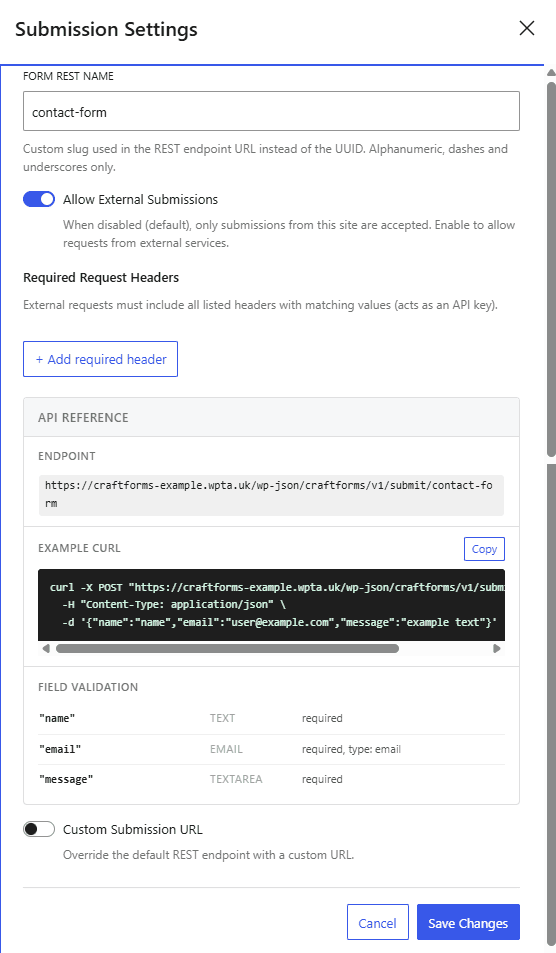
Once we save these changes, our form is now embedable, and our REST API route is open and ready to accept submissions. We now need to set our allowed domain by generating a key
Generate the embed key
So now, after we’ve saved our forms, we navigate to Settings in CraftForms and then to Embed and begin the process of allowing our new form to run on our static domain
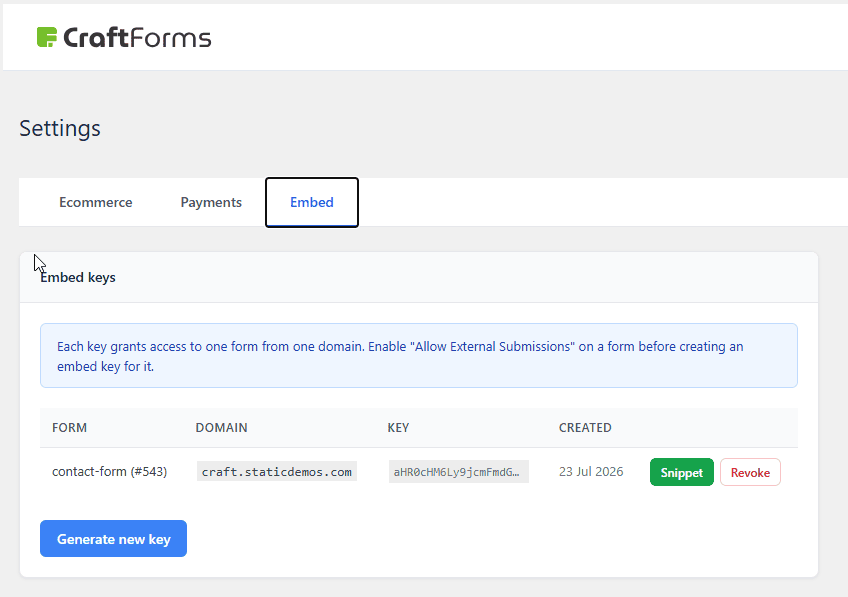
You can see my example above to add a new one; we would push Generate New Key, and you would get the following popup displayed
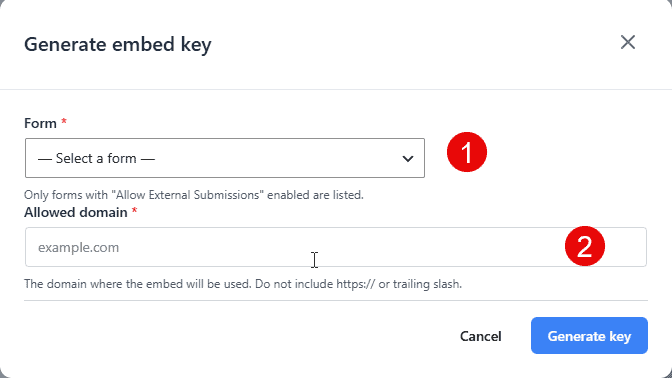
You then select the form you’re talking about in step 1 and the domain without any https or trailing slashes in step 2. In my case, it was craft.staticdemos.com and push generate key at which time a popup will then display the code you can add manually to a site to display the form where you want it in our case we just want the key.
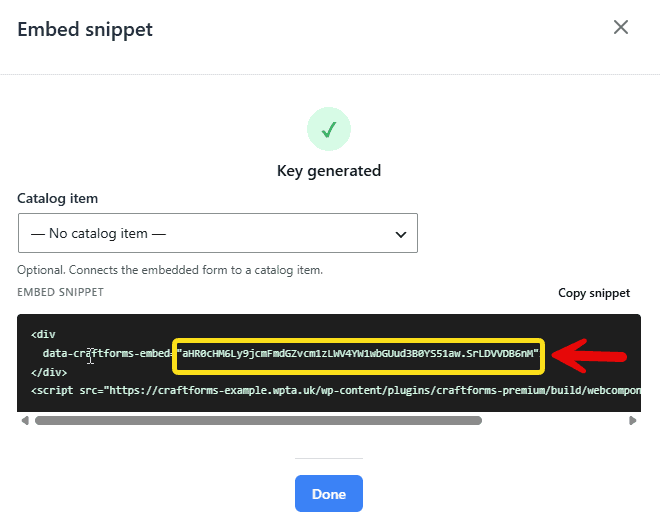
The key is highlighted in yellow with the arrow, and we will need this for our shortcode from the documentation. This screen would be an excellent place for future dev for a single copyable shortcode block to allow this to be done without having to manually copy the key a suggestion I may make to the developer.
Add our shortcode from above.
We are now making real progress; we have a replacement form. It should now load from our remote site. The next thing to do is replace our original form with the new Craftform form that will display on the remote site. I just deleted the Kadence form and added a shortcode in its place; the shortcode contained our craftforms_static_form key="aHR0cHM6Ly9jcmFmdGZvcm1zLWV4YW1wbGUud3B0YS51aw.hillVTiPJA4" shortcode, which is what is needed to display the embedded snippet for our form and we are done.
We can then export our site as normal using Simply Static, and our form should now be using CraftForms. Because we are using CraftForms, we don’t need to keep the Simply Static forms integration on, and using native CraftForms saves us the drift we experience when the form provider updates the from i.e., Fluent Forms in Simply Static. This may take a little more time to set up but is totally native to CraftForms, so we shouldn’t ever suffer from this drift again, so no more broken static forms.
Final Notes:
This has been a very specific single working example of a contact form. I plan on continuing my testing with backend automation based on submissions and hopefully e-commerce too, using flowmattic; these could both operate on a restricted incoming availability and therefore allow lightning-fast loading and security on the front end but all the flexibility on the backend, i.e automatic pdf delivery, bookings and confirmation.
I created a video of how this all works for my YouTube channel, and you can see the whole site generation in action by watching the video below