I had an interesting discussion earlier this week with someone about switching their plugin to UUPD and how they would do so, given that they are actively working on Version 4 of their plugin. They wanted to migrate to UUPD in version 3. x.x now, and also from V4, and keep them separate.
I informed them they could do this, and it’s actually really easy, thanks in part to the flexible, filtered nature of UUPD
Note: The code in this example is for UUPD V2, which is currently in beta, and RC will be released soon. It is expected that the finalised V2 will be released sometime in May or early June.
Update Channels:
Update channels are a simple but powerful idea that can make your plugin updates much safer and more flexible.
Instead of every installation checking the same update URL, you can split your updates into channels like:
- Stable
- Beta
- Release Candidate (RC)
- Major version tracks (e.g. v2)
This gives you full control over who gets what.
Why use update channels?
Without channels, your plugin might look like this:
'server' => 'https://example.com/uupd.json'
Every user gets whatever is in that file.
That becomes limiting when you want to:
- Test new versions safely
- Keep breaking changes away from stable users
- Maintain multiple major versions
- Offer early access to testers
Note: UUPD allows safe pre-releases on the same channel, but sometimes this isn’t enough. Pre-releases were added to UUPD to allow me to offer pre-releases to my MainWP plugins as I was developing them
A friendlier approach: opt-in updates
Instead of forcing users onto new versions, let them choose.
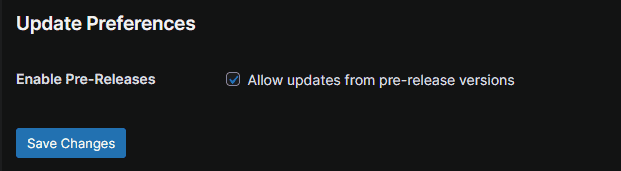
Add a simple toggle:
Enable updates from pre-release versions for example
This way:
- Regular users stay safe on a stable
- Testers can opt into new features
- You get feedback before a full release
Let’s say you want to undertake a major version track, think keeping version 3. x.x in motion while also working on a new feature breaking 4.0
The Basic Setup
Step 1: Store the user’s preference
update_option('my_plugin_update_channel', 'stable'); // or 'beta'
Step 2: Choose the update server
function my_plugin_get_update_server() {
$channel = get_option('my_plugin_update_channel', 'stable');
switch ($channel) {
case 'beta':
return 'https://example.com/updates/my-plugin-beta.json';
case 'v4':
return 'https://example.com/updates/my-plugin-v2.json';
case 'stable':
default:
return 'https://example.com/updates/my-plugin.json';
}
}Step 3: Pass into your updater
$updater_config = [
    'vendor'      => 'myvendor',
    'plugin_file' => plugin_basename(__FILE__),
    'slug'        => 'my-plugin',
    'name'        => 'My Plugin',
    'version'     => MY_PLUGIN_VERSION,
    'server'      => my_plugin_get_update_server(),
    'allow_prerelease' => get_option('my_plugin_update_channel') === 'beta',
];Example channel layouts
Simple setup
- my-plugin.json → stable
- my-plugin-beta.json → beta
With major version separation
- my-plugin.json → 3.x
- my-plugin-v2.json → 4.x
Version-based routing example
function my_plugin_get_update_server() {
if (version_compare(MY_PLUGIN_VERSION, '2.0.0', '>=')) {
return 'https://example.com/updates/my-plugin-v2.json';
}
return 'https://example.com/updates/my-plugin.json';
}Filter-based routing (advanced)
add_filter('uupd/server_url/myvendor/my-plugin', function ($url) {
$channel = get_option('my_plugin_update_channel', 'stable');
if ($channel === 'beta') {
return 'https://example.com/updates/my-plugin-beta.json';
}
if ($channel === 'v2') {
return 'https://example.com/updates/my-plugin-v2.json';
}
return $url;
});Best practices
- Use one file per channel where versions change within this file.
- Keep stable users away from prereleases and dev versions unless they want them
- Use clear naming
- Let users opt in to risky updates
- Separate breaking versions when needed
Final thoughts
Update channels turn your updater into a release system, not just a delivery tool.
With just a simple toggle and a few JSON files, you can:
- Test safely
- Release confidently
- Support multiple versions cleanly
- Switch between Dev Versions
Once you start using channels, you’ll likely never go back to not having them.